$129.66
Add to Cart
Mazda radio iPod interface w/ TEXT + 3.5mm aux audio input cable. BT/HD optional
SUMMARY
Brand new, in the retail packaging
Includes vehicle-specific cable
-(Others sell it separately)
Control your iPod functions from the radio
-(so you can keep your iPod out of sight)
-OR the iPod *
Displays song title & artist on satellite capable radios *
Charges your iPod while it is connected (*** Unless noted below)
Compatible with all 30-pin iPods
-Not compatible with Lightning connector
--Unless you add an authentic Apple adapter
Apple-licensed connector for superior performance
Has an extra input.
-Add Bluetooth, HD Radio, Sirius, or another device
-(see DETAILS)
Extra auxiliary input comes with both
-RCA and
-stereo mini (headphone type) connections
Direct connection
-(No FM modulator or cassette adapter required)
Compatible with or without factory steering wheel controls
Compatible with or without factory navigation radio *
Compatible with or without remote factory CD changer
Compatible with or without factory rear seat entertainment
Compatible with or without factory satellite radio
-(Sirius or XM)
Factory radio must either be
-satellite ready or
-have satellite radio in order to use this
We're an authorized iSimple/Peripheral/PAC dealer
-(Ensures you get a valid warranty.)
DETAILS
This digital iPod Interface by iSimple is a state of the art product that allows you to directly connect your iPod (see list below) to the auxiliary input port of your factory radio. The cable that connects this to your radio is a T-harness, so it has a plug to allow you, in most cases, to retain a factory auxiliary input currently connected to the radio.
Unlike some other products, this interface allows full control of iPod functions through the radio controls OR from the iPod itself. This includes: track up/down, playlist selection, shuffle modes, scan and repeat.
This works with your factory satellite-ready radio. Playlist, track name, artist and album name are displayed on the factory radio when you are in radio control mode.* If you are in iPod control mode, the only feature you can control from the radio is the volume and you will not have text on the radio.
Unlike competitor's products, this includes an auxiliary (aux) input cable so you can add another device. (mp3 player, satellite radio, CD changer, DVD player, etc). You can choose from RCA jacks OR a stereo mini plug. Or, use the port to add something cooler, like Bluetooth (with the ISBT21 kit for your iPhone - not included), HD Radio (with the HDRT tuner package - not included) OR Sirius satellite with the SCC1 tuner and ISSR11 cable (neither are included.) You cannot, however, have more than two sources connected at the same time. The iPod counts as one source, so you would have to choose between Bluetooth, HD Radio, Sirius radio or a standard auxiliary input for the second source. (Although you could fore-go use of the iPod and use both the inputs far any two of the other options.) If you want to add Satellite radio, HD Radio or the Bluetooth kit, you can select it from the drop-down list below. However, we encourage you to go to the Satellite Radio, HD Radio and/or Bluetooth categories on our website to read more about these products before you select one.
For superior performance, only Apple-licensed connectors are used, not knock-offs. It also charges your iPod while it is connected.
iSimple and Peripheral are owned by the same company and offer the exact same products with different model numbers and packaging. Depending on availability, you may receive the Peripheral equivalent. Again, they have the exact same functionality.
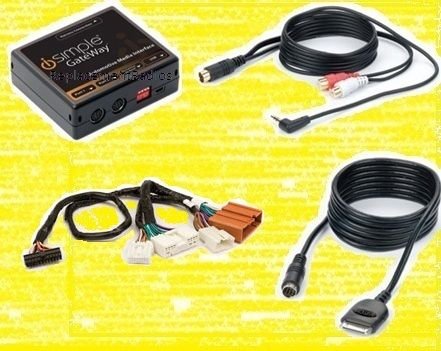
Included with this package (ISMZ571):
-iPod interface module (PXAMG)
-Cable to connect iPod to iPod interface
-T-harness to connect iPod interface to factory auxiliary input (PGHMZ1)
-Auxiliary input cable with RCA and stereo mini plugs
Compatible with all Apple products with the 30-pin connector.
APPLICATIONS
-2009 Mazda 5
-2010 Mazda 3
-2010 Mazda 5
-2010 Mazda 6 *
-2010 Mazda CX-7
-2010 Mazda CX-9 *
-2010 Mazda RX-8
-2011 Mazda 3
-2011 Mazda 6 *
-2011 Mazda CX-7
-2011 Mazda CX-9 *
-2011 Mazda RX-8
-2012 Mazda 6 *
-2012 Mazda CX-7
-2012 Mazda CX-9 *
* Mazda 6 & CX-9 equipped with mid-line & navigation radio will only support basic iPod operation. (Mid-line radios will have a small color LCD screen in the middle of the face of the radio.)
SHIPPING & HANDLING
-Shipping cost is based on weight and zip code. This site does the figuring, not us. If you feel their calculation is high, you might be underestimating the package weight, size, and/or current shipping costs from our zip code (62401) to yours. Please don't ding us for shipping in the ratings, as we have no control over ever-increasing carrier rates.
-We will enter a tracking number into your order details here on the site.
They will email it to you if your notification preferences are set correctly.
-A signature is not typically required. If you are not home to receive the package, it will most likely be left at your door. Please monitor it's progress and arrange to collect it when it arrives.
-This site provides a section/tab in each ad for Shipping information.
We encourage you to check that section for prices, methods, time-frames, etc
Brand new, in the retail packaging
Includes vehicle-specific cable
-(Others sell it separately)
Control your iPod functions from the radio
-(so you can keep your iPod out of sight)
-OR the iPod *
Displays song title & artist on satellite capable radios *
Charges your iPod while it is connected (*** Unless noted below)
Compatible with all 30-pin iPods
-Not compatible with Lightning connector
--Unless you add an authentic Apple adapter
Apple-licensed connector for superior performance
Has an extra input.
-Add Bluetooth, HD Radio, Sirius, or another device
-(see DETAILS)
Extra auxiliary input comes with both
-RCA and
-stereo mini (headphone type) connections
Direct connection
-(No FM modulator or cassette adapter required)
Compatible with or without factory steering wheel controls
Compatible with or without factory navigation radio *
Compatible with or without remote factory CD changer
Compatible with or without factory rear seat entertainment
Compatible with or without factory satellite radio
-(Sirius or XM)
Factory radio must either be
-satellite ready or
-have satellite radio in order to use this
We're an authorized iSimple/Peripheral/PAC dealer
-(Ensures you get a valid warranty.)
DETAILS
This digital iPod Interface by iSimple is a state of the art product that allows you to directly connect your iPod (see list below) to the auxiliary input port of your factory radio. The cable that connects this to your radio is a T-harness, so it has a plug to allow you, in most cases, to retain a factory auxiliary input currently connected to the radio.
Unlike some other products, this interface allows full control of iPod functions through the radio controls OR from the iPod itself. This includes: track up/down, playlist selection, shuffle modes, scan and repeat.
This works with your factory satellite-ready radio. Playlist, track name, artist and album name are displayed on the factory radio when you are in radio control mode.* If you are in iPod control mode, the only feature you can control from the radio is the volume and you will not have text on the radio.
Unlike competitor's products, this includes an auxiliary (aux) input cable so you can add another device. (mp3 player, satellite radio, CD changer, DVD player, etc). You can choose from RCA jacks OR a stereo mini plug. Or, use the port to add something cooler, like Bluetooth (with the ISBT21 kit for your iPhone - not included), HD Radio (with the HDRT tuner package - not included) OR Sirius satellite with the SCC1 tuner and ISSR11 cable (neither are included.) You cannot, however, have more than two sources connected at the same time. The iPod counts as one source, so you would have to choose between Bluetooth, HD Radio, Sirius radio or a standard auxiliary input for the second source. (Although you could fore-go use of the iPod and use both the inputs far any two of the other options.) If you want to add Satellite radio, HD Radio or the Bluetooth kit, you can select it from the drop-down list below. However, we encourage you to go to the Satellite Radio, HD Radio and/or Bluetooth categories on our website to read more about these products before you select one.
For superior performance, only Apple-licensed connectors are used, not knock-offs. It also charges your iPod while it is connected.
iSimple and Peripheral are owned by the same company and offer the exact same products with different model numbers and packaging. Depending on availability, you may receive the Peripheral equivalent. Again, they have the exact same functionality.
Included with this package (ISMZ571):
-iPod interface module (PXAMG)
-Cable to connect iPod to iPod interface
-T-harness to connect iPod interface to factory auxiliary input (PGHMZ1)
-Auxiliary input cable with RCA and stereo mini plugs
Compatible with all Apple products with the 30-pin connector.
APPLICATIONS
-2009 Mazda 5
-2010 Mazda 3
-2010 Mazda 5
-2010 Mazda 6 *
-2010 Mazda CX-7
-2010 Mazda CX-9 *
-2010 Mazda RX-8
-2011 Mazda 3
-2011 Mazda 6 *
-2011 Mazda CX-7
-2011 Mazda CX-9 *
-2011 Mazda RX-8
-2012 Mazda 6 *
-2012 Mazda CX-7
-2012 Mazda CX-9 *
* Mazda 6 & CX-9 equipped with mid-line & navigation radio will only support basic iPod operation. (Mid-line radios will have a small color LCD screen in the middle of the face of the radio.)
SHIPPING & HANDLING
-Shipping cost is based on weight and zip code. This site does the figuring, not us. If you feel their calculation is high, you might be underestimating the package weight, size, and/or current shipping costs from our zip code (62401) to yours. Please don't ding us for shipping in the ratings, as we have no control over ever-increasing carrier rates.
-We will enter a tracking number into your order details here on the site.
They will email it to you if your notification preferences are set correctly.
-A signature is not typically required. If you are not home to receive the package, it will most likely be left at your door. Please monitor it's progress and arrange to collect it when it arrives.
-This site provides a section/tab in each ad for Shipping information.
We encourage you to check that section for prices, methods, time-frames, etc


