$129.66
Add to Cart
Toyota radio iPod interface +3.5mm aux audio input adapter cable.Text capable 98
SUMMARY
Brand new, in the retail packaging
Includes vehicle-specific cable
-(Others sell it separately)
Control your iPod functions from the radio OR the iPod
-(so you can keep your iPod out of sight)
Displays song title & artist on satellite capable radios
Charges your 30-pin iPod while it is connected
Compatible with most 30-pin iPods
A 30-pin Bluetooth receiver is available that allows use w/ newer Apple devices
-(See DETAILS)
A 30-pin to Lightning adapter is available from the Apple store
-(Knock-offs don't work right!)
Apple-licensed connector for superior performance
Has an extra input.
-Add Bluetooth, HD Radio, SiriusXM or another device
-(see DETAILS)
Extra auxiliary input comes with both RCA and stereo mini (headphone type) connections
Direct connection
-(No FM modulator or cassette adapter required)
Compatible with factory radios only
-(Not aftermarket)
Compatible with or without factory steering wheel controls
Not always compatible with navigation system
-(See notes in Application List link)
2009+ Venza only compatible with navigation radio
2011 Sienna only compatible with navigation radio
2012+ Camry & Prius equipped with factory navigation radios are not compatible
2012+ Toyota Tundra equipped with factory navigation radios are not compatible
2010+ 4Runner only compatible with navigation radio
Compatible with or without Rear Seat Entertainment DVD system
Not always compatible with remote (separate from radio) CD changer
-(See DETAILS)
Not compatible if factory satellite radio is already installed
-(Must be disconnected)
Dual emulation mode:
-satellite (SAT) or remote CD Changer (CDC)
Radio MUST have an AM/SAT button to operate in SAT emulation mode...OR...
Radio must have a DISC or CD button to operate in CDC emulation mode
Radios with Diversity Antenna require minor modification to radio power wire
-(Documented in instructions)
We're an authorized Peripheral/PAC/iSimple dealer
-(Ensures you get a valid warranty.)
1 year warranty
DETAILS
This Digital iPod Interface is a state of the art product that allows you to directly connect your iPod (see list below) to the auxiliary input port of your factory radio. The cable that connects this to your radio is a T-harness, so it has a plug to allow you, in most cases, to retain a factory auxiliary input currently connected to the radio.
Unlike some other products, this interface allows full control of 30-pin iPod functions through the radio controls OR from the iPod itself. This includes: track up/down, playlist selection, shuffle modes, scan and repeat. Don't have a 30-pin connector? Check out these optional, extra-cost add-ons: Option 1) You can add a Bluetooth receiver that will allow music to stream through the included 30-pin iPod cable. (Search our eCRATER store for BLUE_AUDIO.) With the optional, extra-cost Bluetooth receiver, the 30-pin cable becomes an Aux Input for audio from your Bluetooth equipped device. Whether it be Apple with a Lightning connector, Android with a micro-USB or a Windows device, the hard-wired connection no longer matters because you're streaming wirelessly. Want to control tracks wirelessly too? We also offer an optional, extra-cost Bluetooth remote. You would use it in conjunction with the BLUE_AUDIO option. (Search our store for BLUE_BUNDLE to find both items bundled together or BLUE_REMOTE for the remote by itself.) Option 2) If you want a hard-wired Lightning connection, you can try the 30-pin to Lightning adapter from Apple. (Do NOT buy a knock-off. They usually don't work for anything but charging. If you're buying anywhere other than Apple, you're probably getting a knock-off!) Check the Apple product reviews though. Their cable version of the adapter gets average to below average reviews for functionality. Their 'block' version of the adapter gets bad reviews for it's size at the connector, which prevents it from being used with many cases.
This product is capable of operating in either satellite (SAT) emulation mode or CD Changer (CDC) emulation mode, to allow compatibility with the maximum number of vehicles/radios. Further, it has two control modes as well: basic and advanced. In SAT emulation mode, this works with satellite-ready radios only. Playlist, track name, artist and album name are displayed on satellite-ready radios when you are in advanced control mode and you operate the interface from the radio. This includes: track up/down, playlist selection, shuffle modes, scan and repeat. Some control is also enabled for the steering wheel controls. If you are in basic control mode, the only feature you can control from the radio is the volume. All other control is from the iPod itself. Text is not displayed on the radio in basic mode. (See the section below, entitled Understanding Emulation and Operation, if you still have questions.) If you don't have a satellite ready radio but your radio is capable of controlling a remote (separate from the radio) CD Changer, you can use this product in CDC emulation mode. You just won't get any text and controls are limited to volume and skipping back and forth between songs.
As a general rule, radios with a built-in CD Changer often did not have the ability to control a remote CD Changer as well, so you would be taking a chance ordering this for a CD6 radio without satellite capability. Returns are not accepted for opened items, so please keep this in mind. (See the section below, entitled Understanding Emulation and Operation, if you still have questions.)
Unlike competitor's products, this includes an auxiliary (aux) input cable so you can add another device. (mp3 player, satellite radio, CD changer, DVD player, etc). You can choose from RCA jacks OR a stereo mini plug. Or, use the port to add something cooler, like Bluetooth (with the ISBT21 kit for your iPhone - not included), HD Radio (with the HDRT tuner package - not included) or SiriusXM satellite with the SXV200 tuner and ISSR12 cable (neither are included.) You cannot, however, have more than two sources connected at the same time. The iPod counts as one source, so you would have to choose between Bluetooth, HD Radio, SiriusXM radio or a standard auxiliary input for the second source. (Although you could fore-go use of the iPod and use both the inputs far any two of the other options.) If you want to add SiriusXM, HD Radio or the Bluetooth kit, we suggest you go to our listings for those products and read more about them. This ad just contains a very brief summary.
Understanding Emulation and Operation
--Emulation refers to the method the interface uses to communicate with the radio: SAT emulation mode 'tricks' the radio into thinking a satellite tuner is attached. The interface takes advantage of the radio's ability to receive text from a satellite tuner, so SAT emulation mode will show text on the radio screen. Obviously SAT emulation mode is more robust than CDC emulation mode but it only works on radios that are satellite ready. In CDC emulation mode, the radio is 'tricked' into thinking there is remote CD Changer attached. CD Changers operate based on disc and track numbers. There is no text. This is why there is just basic skipping back and forth between songs when in CDC emulation mode. The radio sees it as skipping to the next song on a CD. Not all radios are satellite capable. That's why CDC emulation mode was added. It allows for compatibility in a greater number of vehicles. But it only works with radios capable of controlling a remote CD Changer.
--Operation mode refers to the method you use to control the iPod: Basic operation mode uses the controls you are already familiar with. Those on the iPod itself. This mode just transmits sound to the radio. There is no text displayed on the radio and there is no control from the radio, other than volume. This is regardless of what emulation mode you are in.Advanced operation mode allows control from the radio and steering wheel buttons. More than just volume. Text is also passed to satellite capable radios for display on the screen. The iPod is 'locked' in Advanced operation mode, meaning you can only use the radio or steering wheel controls. If you want to use the iPod controls, you must switch to Basic operation mode.
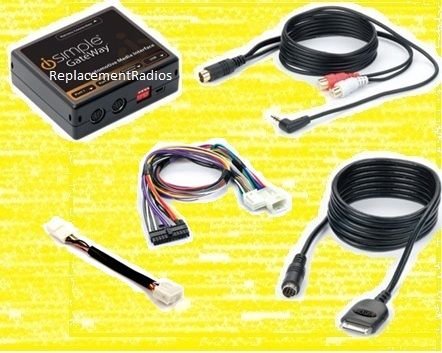
Included with this package (ISTY571):
-iPod interface module (PXAMG)
-Cable to connect iPod to iPod interface
-Harness to connect iPod interface to back of factory radio (PGHTY1 & PGHTY1B)
-Auxiliary input cable with RCA and stereo mini plugs
APPLICATIONS
Most 1998 and newer Toyota vehicles with a radio that has an AM-SAT, DISC or CD button. (Except where noted below.)
=1998-2013 4Runner
=2007-2012 Avalon
=1998-2012 Camry
=1999-2007 Camry Solara
=1998-2013 Corolla
=2007-2010 FJ Cruiser
=2001-2013 Highlander
=2007-2007 Land Cruiser
=2005-2013 Matrix
=2004-2013 Prius
=1998-2012 Rav4
=2001-2013 Sequoia
=2003-2011 Sienna
=1998-2012 Tacoma
=1999-2013 Tundra
=2009-2013 Venza
=2009-2013 Yaris
Brand new, in the retail packaging
Includes vehicle-specific cable
-(Others sell it separately)
Control your iPod functions from the radio OR the iPod
-(so you can keep your iPod out of sight)
Displays song title & artist on satellite capable radios
Charges your 30-pin iPod while it is connected
Compatible with most 30-pin iPods
A 30-pin Bluetooth receiver is available that allows use w/ newer Apple devices
-(See DETAILS)
A 30-pin to Lightning adapter is available from the Apple store
-(Knock-offs don't work right!)
Apple-licensed connector for superior performance
Has an extra input.
-Add Bluetooth, HD Radio, SiriusXM or another device
-(see DETAILS)
Extra auxiliary input comes with both RCA and stereo mini (headphone type) connections
Direct connection
-(No FM modulator or cassette adapter required)
Compatible with factory radios only
-(Not aftermarket)
Compatible with or without factory steering wheel controls
Not always compatible with navigation system
-(See notes in Application List link)
2009+ Venza only compatible with navigation radio
2011 Sienna only compatible with navigation radio
2012+ Camry & Prius equipped with factory navigation radios are not compatible
2012+ Toyota Tundra equipped with factory navigation radios are not compatible
2010+ 4Runner only compatible with navigation radio
Compatible with or without Rear Seat Entertainment DVD system
Not always compatible with remote (separate from radio) CD changer
-(See DETAILS)
Not compatible if factory satellite radio is already installed
-(Must be disconnected)
Dual emulation mode:
-satellite (SAT) or remote CD Changer (CDC)
Radio MUST have an AM/SAT button to operate in SAT emulation mode...OR...
Radio must have a DISC or CD button to operate in CDC emulation mode
Radios with Diversity Antenna require minor modification to radio power wire
-(Documented in instructions)
We're an authorized Peripheral/PAC/iSimple dealer
-(Ensures you get a valid warranty.)
1 year warranty
DETAILS
This Digital iPod Interface is a state of the art product that allows you to directly connect your iPod (see list below) to the auxiliary input port of your factory radio. The cable that connects this to your radio is a T-harness, so it has a plug to allow you, in most cases, to retain a factory auxiliary input currently connected to the radio.
Unlike some other products, this interface allows full control of 30-pin iPod functions through the radio controls OR from the iPod itself. This includes: track up/down, playlist selection, shuffle modes, scan and repeat. Don't have a 30-pin connector? Check out these optional, extra-cost add-ons: Option 1) You can add a Bluetooth receiver that will allow music to stream through the included 30-pin iPod cable. (Search our eCRATER store for BLUE_AUDIO.) With the optional, extra-cost Bluetooth receiver, the 30-pin cable becomes an Aux Input for audio from your Bluetooth equipped device. Whether it be Apple with a Lightning connector, Android with a micro-USB or a Windows device, the hard-wired connection no longer matters because you're streaming wirelessly. Want to control tracks wirelessly too? We also offer an optional, extra-cost Bluetooth remote. You would use it in conjunction with the BLUE_AUDIO option. (Search our store for BLUE_BUNDLE to find both items bundled together or BLUE_REMOTE for the remote by itself.) Option 2) If you want a hard-wired Lightning connection, you can try the 30-pin to Lightning adapter from Apple. (Do NOT buy a knock-off. They usually don't work for anything but charging. If you're buying anywhere other than Apple, you're probably getting a knock-off!) Check the Apple product reviews though. Their cable version of the adapter gets average to below average reviews for functionality. Their 'block' version of the adapter gets bad reviews for it's size at the connector, which prevents it from being used with many cases.
This product is capable of operating in either satellite (SAT) emulation mode or CD Changer (CDC) emulation mode, to allow compatibility with the maximum number of vehicles/radios. Further, it has two control modes as well: basic and advanced. In SAT emulation mode, this works with satellite-ready radios only. Playlist, track name, artist and album name are displayed on satellite-ready radios when you are in advanced control mode and you operate the interface from the radio. This includes: track up/down, playlist selection, shuffle modes, scan and repeat. Some control is also enabled for the steering wheel controls. If you are in basic control mode, the only feature you can control from the radio is the volume. All other control is from the iPod itself. Text is not displayed on the radio in basic mode. (See the section below, entitled Understanding Emulation and Operation, if you still have questions.) If you don't have a satellite ready radio but your radio is capable of controlling a remote (separate from the radio) CD Changer, you can use this product in CDC emulation mode. You just won't get any text and controls are limited to volume and skipping back and forth between songs.
As a general rule, radios with a built-in CD Changer often did not have the ability to control a remote CD Changer as well, so you would be taking a chance ordering this for a CD6 radio without satellite capability. Returns are not accepted for opened items, so please keep this in mind. (See the section below, entitled Understanding Emulation and Operation, if you still have questions.)
Unlike competitor's products, this includes an auxiliary (aux) input cable so you can add another device. (mp3 player, satellite radio, CD changer, DVD player, etc). You can choose from RCA jacks OR a stereo mini plug. Or, use the port to add something cooler, like Bluetooth (with the ISBT21 kit for your iPhone - not included), HD Radio (with the HDRT tuner package - not included) or SiriusXM satellite with the SXV200 tuner and ISSR12 cable (neither are included.) You cannot, however, have more than two sources connected at the same time. The iPod counts as one source, so you would have to choose between Bluetooth, HD Radio, SiriusXM radio or a standard auxiliary input for the second source. (Although you could fore-go use of the iPod and use both the inputs far any two of the other options.) If you want to add SiriusXM, HD Radio or the Bluetooth kit, we suggest you go to our listings for those products and read more about them. This ad just contains a very brief summary.
Understanding Emulation and Operation
--Emulation refers to the method the interface uses to communicate with the radio: SAT emulation mode 'tricks' the radio into thinking a satellite tuner is attached. The interface takes advantage of the radio's ability to receive text from a satellite tuner, so SAT emulation mode will show text on the radio screen. Obviously SAT emulation mode is more robust than CDC emulation mode but it only works on radios that are satellite ready. In CDC emulation mode, the radio is 'tricked' into thinking there is remote CD Changer attached. CD Changers operate based on disc and track numbers. There is no text. This is why there is just basic skipping back and forth between songs when in CDC emulation mode. The radio sees it as skipping to the next song on a CD. Not all radios are satellite capable. That's why CDC emulation mode was added. It allows for compatibility in a greater number of vehicles. But it only works with radios capable of controlling a remote CD Changer.
--Operation mode refers to the method you use to control the iPod: Basic operation mode uses the controls you are already familiar with. Those on the iPod itself. This mode just transmits sound to the radio. There is no text displayed on the radio and there is no control from the radio, other than volume. This is regardless of what emulation mode you are in.Advanced operation mode allows control from the radio and steering wheel buttons. More than just volume. Text is also passed to satellite capable radios for display on the screen. The iPod is 'locked' in Advanced operation mode, meaning you can only use the radio or steering wheel controls. If you want to use the iPod controls, you must switch to Basic operation mode.
Included with this package (ISTY571):
-iPod interface module (PXAMG)
-Cable to connect iPod to iPod interface
-Harness to connect iPod interface to back of factory radio (PGHTY1 & PGHTY1B)
-Auxiliary input cable with RCA and stereo mini plugs
APPLICATIONS
Most 1998 and newer Toyota vehicles with a radio that has an AM-SAT, DISC or CD button. (Except where noted below.)
=1998-2013 4Runner
=2007-2012 Avalon
=1998-2012 Camry
=1999-2007 Camry Solara
=1998-2013 Corolla
=2007-2010 FJ Cruiser
=2001-2013 Highlander
=2007-2007 Land Cruiser
=2005-2013 Matrix
=2004-2013 Prius
=1998-2012 Rav4
=2001-2013 Sequoia
=2003-2011 Sienna
=1998-2012 Tacoma
=1999-2013 Tundra
=2009-2013 Venza
=2009-2013 Yaris


